
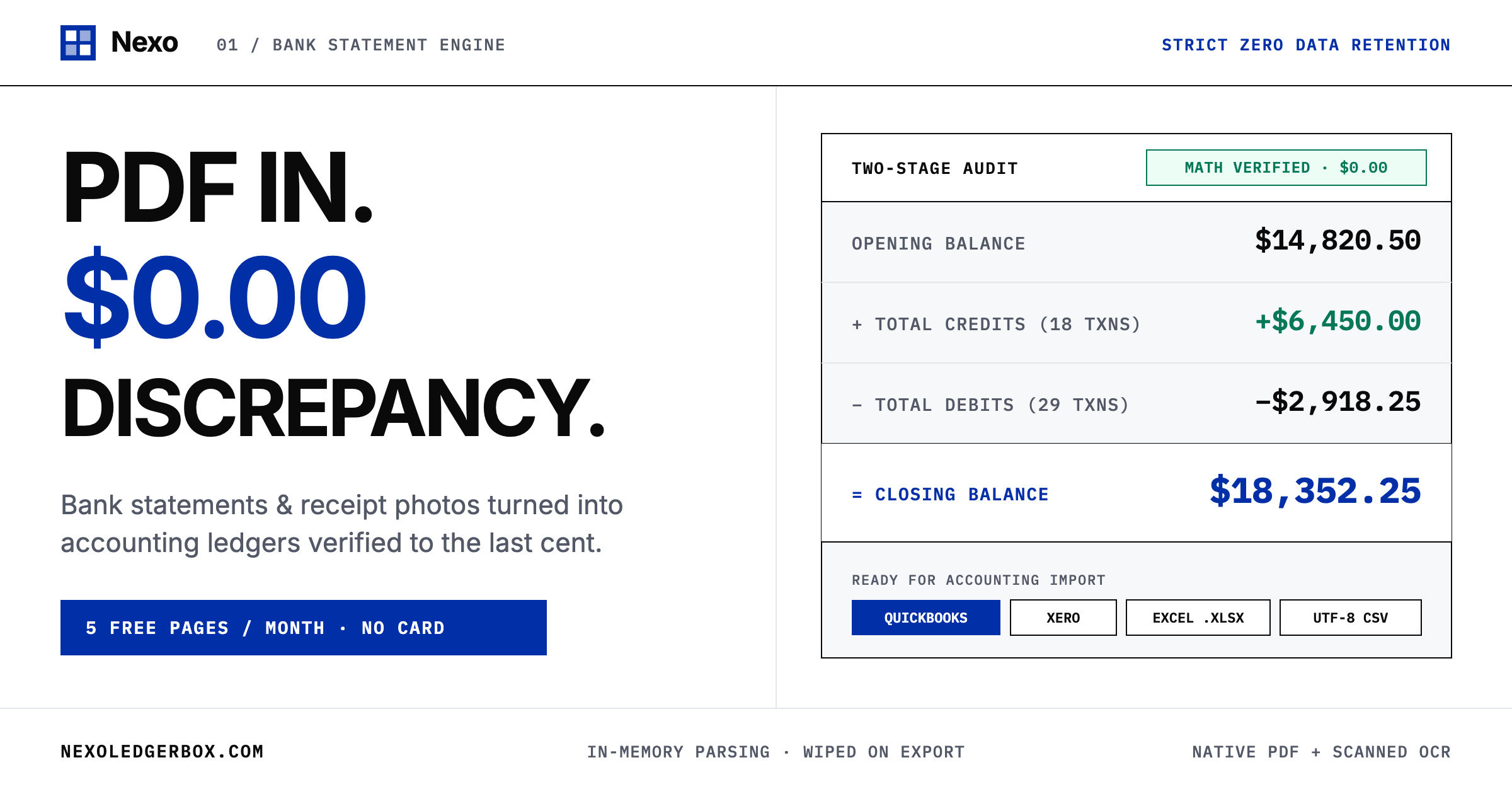
Every AI wrapper demo makes PDF-to-Excel conversion look solved: upload a bank statement, send it to a vision or text model with "Return JSON", and render a table.
When I built Nexo Ledgerbox for freelance bookkeepers, landlords, and small-business owners, that naive pipeline broke on week one. Not because LLMs can't read text, but because accounting has zero tolerance for "mostly right."
Three failure modes showed up immediately in real multi-page statements:
- Silent $0.01 hallucinations and sign flips: A model turns a
-42.19fee into42.19, drops a negative sign on a credit memo, or misreads one8as3. Everything looks clean in CSV until reconciliation fails by $0.05 at 11 PM during tax season. - Latency and token waste on digital PDFs: A standard 6-to-20 page bank statement already contains crisp vector text coordinates—plus 2–3 pages of fine-print legal disclosures (
"What To Do If You Think You Find A Mistake"). Sending all of that through a multimodal LLM costs money and seconds for zero accuracy gain. - Privacy deal-breakers: Bookkeepers and SMB owners understandably refuse to upload raw corporate bank PDFs into tools that park files in S3 buckets, dump payloads into logs, or auto-record browser sessions.
Here is the engineering architecture we ended up building in Node 24 + TypeScript to solve all three: deterministic (x, y) coordinate parsing, two-stage integer-cents math verification, and strict RAM-only zero data retention.
1. Hybrid Routing: Deterministic (x, y) Coordinate Bucketing Before Touching an LLM
Before invoking any language model, every uploaded PDF passes through an in-memory preflight router (pdfRouter.ts) powered by pdfjs-dist.
Instead of flattening page.getTextContent() into a dumb string—which scrambles multi-column bank tables into unreadable word soup—we bucket each text span by its rounded PDF y coordinate and sort left-to-right by x:
// app/src/statement/pdfRouter.ts
async function extractPageLayoutText(
  doc: Awaited<ReturnType<typeof pdfjsLib.getDocument>['promise']>,
  pageNumber: number
): Promise<PdfPageText> {
  const page = await doc.getPage(pageNumber);
  const content = await page.getTextContent();

  // Group spans into visual rows by rounded Y coordinate so table columns stay aligned.
  const rowMap = new Map<number, PdfLayoutItem[]>();

  for (const rawItem of content.items) {
    const item = rawItem as PdfTextItemLike;
    const text = item.str?.trim();
    if (!text) continue;

    const transform = item.transform ?? [1, 0, 0, 1, 0, 0];
    const x = Math.round((transform[4] ?? 0) * 10) / 10;
    const y = Math.round((transform[5] ?? 0) / 3) * 3;

    const bucket = rowMap.get(y) ?? [];
    bucket.push({ x, text });
    rowMap.set(y, bucket);
  }

  // Sort rows top-to-bottom (higher Y first in PDF coordinates) and left-to-right.
  const sortedY = Array.from(rowMap.keys()).sort((a, b) => b - a);
  const rows: PdfLayoutRow[] = sortedY.map((y) => {
    const items = rowMap.get(y) ?? [];
    items.sort((a, b) => a.x - b.x);
    return {
      y,
      items,
      lineText: items.map((entry) => entry.text).join('  '),
    };
  });

  const joined = rows.map((r) => r.lineText).join('\n');
  const nonWhitespaceCount = joined.replace(/\s+/g, '').length;
  const isNoisePage = detectNoiseDisclosurePage(joined);

  return { pageNumber, text: joined, charCount: nonWhitespaceCount, rows, isNoisePage };
}
Two small details made a massive difference here:
- Noise-page filtering (
detectNoiseDisclosurePage): If a page lacks transaction dates and formatted money amounts, and matches standard boilerplate headings (Account Reconciliation Form,In Case of Errors or Questions About Your Electronic Transfers), it is taggedisNoisePageand excluded from prompt payloads. - Deterministic fast-path routing: If
averageCharsPerPage >= 120and the document matches/\d+[.,]\d{2}/, it goes to our text route—where our deterministic local table parser handles standard digital bank statements first. Scanned PDFs and mobile receipt photos (PNG/JPG/WEBP) skip text extraction and route directly to vision.
On our internal 6-page sample statement benchmark (47 transactions), the deterministic coordinate parser finishes in ~87ms at $0 API token cost, while still passing through the exact same normalization and math audit pipeline as vision outputs.
2. Two-Stage Integer-Cents Math Verification (Without Cascade False Positives)
Even deterministic parsers hit weird bank exports, and OCR/vision extraction will eventually misread a digit on a crumpled receipt or blurry scan. The real question isn't "can we hit 100% OCR perfection forever?"—it's "can the system mathematically prove whether every cent adds up, and pinpoint the exact broken row when it doesn't?"
First rule: never do ledger arithmetic in IEEE-754 floats. In JavaScript, 0.1 + 0.2 === 0.30000000000000004 is funny in tweets and fatal in accounting exports. Every opening balance, debit, credit, running balance, and closing balance is converted to integer cents (toCents) before verification runs (app/src/statement/mathVerifier.ts):
// app/src/statement/mathVerifier.ts
export function verifyStatement(statement: ParsedStatement): VerificationResult {
  const openingCents = toCents(statement.opening_balance);
  const closingCents = toCents(statement.closing_balance);

  let totalCreditsCents = 0;
  let totalDebitsCents = 0;

  const hasRunningBalance = statement.transactions.some(
    (tx) => typeof tx.running_balance === 'number'
  );

  const rowDiscrepancies: RowDiscrepancy[] = [];
  let runningCents = openingCents;

  statement.transactions.forEach((tx, index) => {
    const creditCents = toCents(tx.credit);
    const debitCents = toCents(tx.debit);

    totalCreditsCents += creditCents;
    totalDebitsCents += debitCents;

    const expectedCents = runningCents + creditCents - debitCents;

    if (typeof tx.running_balance === 'number') {
      const actualCents = toCents(tx.running_balance);
      const diffCents = actualCents - expectedCents;

      if (diffCents !== 0) {
        rowDiscrepancies.push({
          rowIndex: index,
          expectedRunningBalance: fromCents(expectedCents),
          actualRunningBalance: fromCents(actualCents),
          discrepancy: fromCents(diffCents),
          reason: `Row ${index + 1} (${tx.date} ${tx.description}): expected balance ${formatCurrencyValue(fromCents(expectedCents))}, got ${formatCurrencyValue(fromCents(actualCents))}.`,
        });
      }

      // Reset baseline to actual running balance so a single OCR typo
      // does not cascade across every subsequent row.
      runningCents = actualCents;
    } else {
      runningCents = expectedCents;
    }
  });

  const computedClosingCents = openingCents + totalCreditsCents - totalDebitsCents;
  const summaryDiffCents = closingCents - computedClosingCents;

  const isVerified = rowDiscrepancies.length === 0 && summaryDiffCents === 0;
  // ...
}
Notice that critical line inside the loop:
runningCents = actualCents;
In our earliest prototype, we carried expectedCents forward instead of resetting runningCents = actualCents. The result? A single misread debit on row #4 caused false discrepancy alerts on rows #5 through #47, overwhelming the user with 44 red flags for 1 typo. Resetting the running baseline to the printed actualCents isolates each error to the exact row where it happened.
When verifyStatement() catches row discrepancies on a multi-step extraction, the pipeline triggers a targeted healDiscrepantRows() pass aimed only at those flagged rows. Any leftover mismatch stays highlighted inline in the workspace (Exp $X.XX), letting the user fix one cell and watch the badge flip to Math Verified ($0.00 discrepancy) before exporting to .xlsx, .csv, QuickBooks CSV, or Xero CSV.
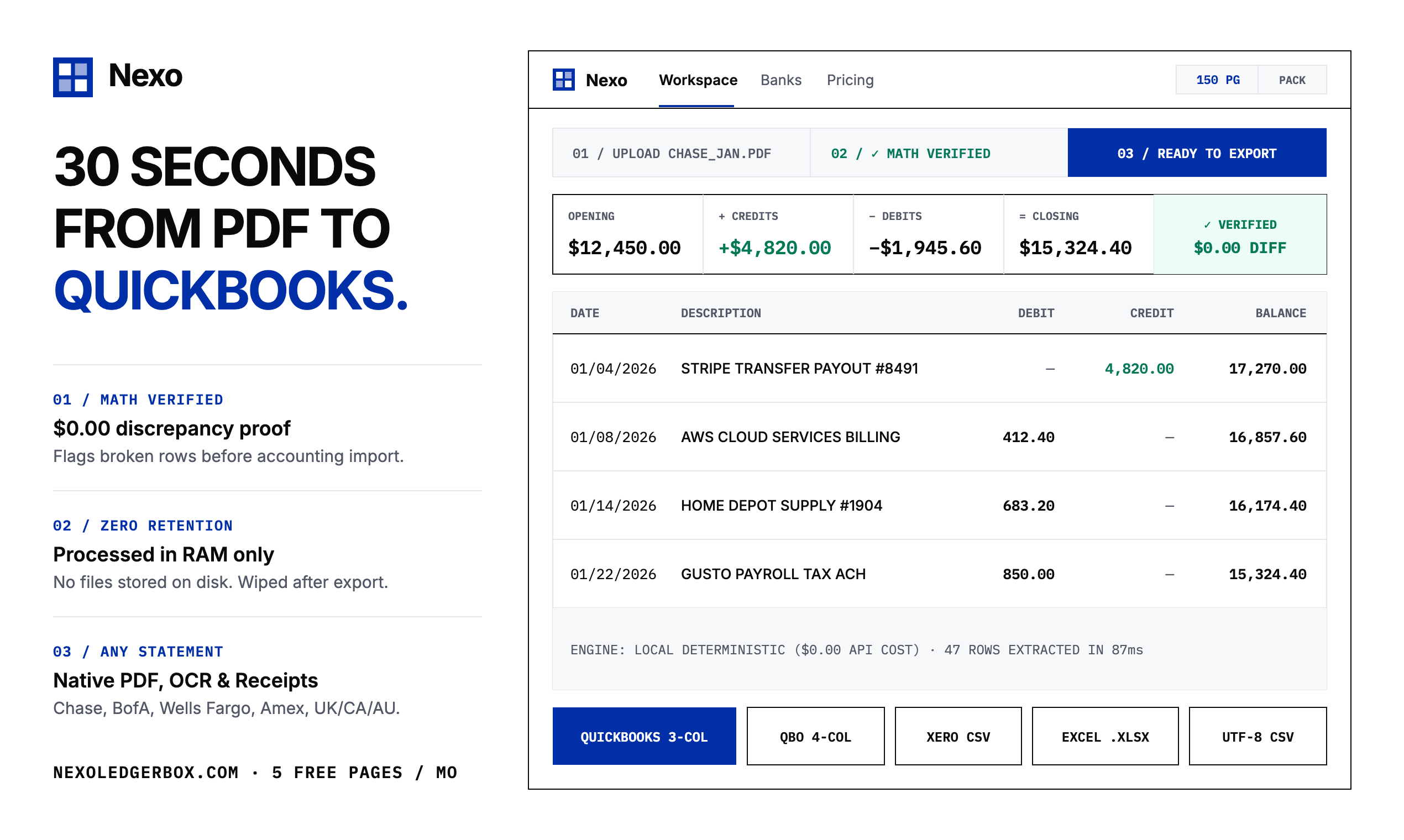
Caption: Nexo Ledgerbox workspace showing inline row-level math verification, discrepancy highlighting, and multi-format accounting exports.
3. True RAM-Only Zero Data Retention (and 3 Subtle Gotchas)
"We delete your files after 24 hours" is marketing fluff. If a PDF never touches disk, there is nothing to delete—and nothing left behind to breach.
Every upload in Nexo Ledgerbox enters via multer.memoryStorage(), stays in a Node Buffer, and is scrubbed inside finally (app/src/statement/operations.ts). While building that guarantee end-to-end, we hit three real gotchas that almost quietly broke it.
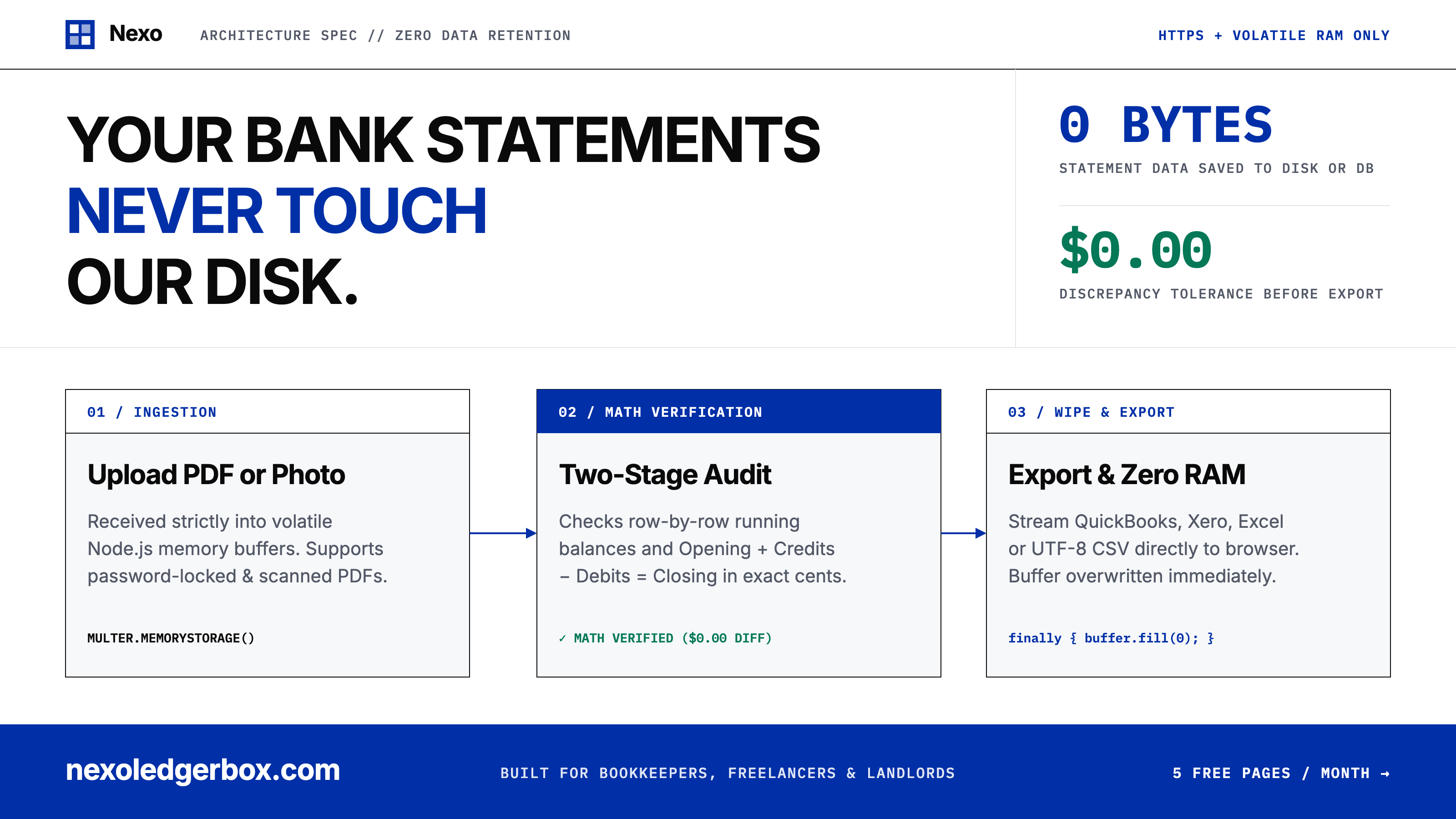
Caption: End-to-end Zero Data Retention pipeline: RAM-only ingress, stdio vision rendering, explicit buffer zeroing, and sanitized telemetry.
Gotcha A: pdfjs-dist detaching your ArrayBuffer (breaking downstream scrubbing)
If you hand pdfBuffer directly to pdfjsLib.getDocument(), worker/stream internals can transfer or detach the underlying ArrayBuffer—causing downstream vision retries or buffer.fill(0) cleanup to operate on a zero-length detached view.
The fix in pdfRouter.ts is copying into an isolated Uint8Array before calling getDocument, while keeping the original input.buffer intact for the finally scrub in operations.ts:
// app/src/statement/pdfRouter.ts
const data = Uint8Array.from(pdfBuffer);

const loadingTask = pdfjsLib.getDocument({
  data,
  password: password || undefined,
  useWorkerFetch: false,
  isEvalSupported: false,
  useSystemFonts: true,
  verbosity: 0,
});
// app/src/statement/operations.ts
} finally {
  // Strict Zero Data Retention: overwrite raw uploaded bytes in RAM immediately.
  if (input.buffer.buffer.byteLength > 0) {
    input.buffer.fill(0);
  }
}
Our SQLite conversion_audits telemetry only stores anonymized counters (page_count, route, model_used, verification_status, duration_ms)—never filenames, transaction descriptions, or account numbers (retained_bytes = 0).
Gotcha B: Rendering scanned PDFs to PNG without writing to /tmp
Many Node PDF-to-image wrappers shell out to pdftoppm or ghostscript using temporary files on /tmp. Even if you fs.unlink() afterward, temp files hit disk I/O and risk leftovers on crash or SIGKILL.
Instead, app/src/statement/pdfImageRenderer.ts spawns Python 3 + PyMuPDF (fitz) and streams the PDF bytes directly over stdin and receives base64 PNGs back over stdout—zero temp files created:
// app/src/statement/pdfImageRenderer.ts
const PYTHON_RENDER_SCRIPT = `
import sys, json, base64, os
import fitz

pdf_bytes = sys.stdin.buffer.read()
dpi = int(os.environ.get("NEXO_RENDER_DPI", "160"))
max_pages = int(os.environ.get("NEXO_RENDER_MAX_PAGES", "12"))
password = os.environ.get("NEXO_PDF_PASSWORD", "")

doc = fitz.open(stream=pdf_bytes, filetype="pdf")
if doc.needs_pass and password:
    doc.authenticate(password)

pages_out = []
count = min(len(doc), max_pages)
for idx in range(count):
    page = doc.load_page(idx)
    pix = page.get_pixmap(dpi=dpi, alpha=False)
    png_bytes = pix.tobytes("png")
    pages_out.append({
        "pageNumber": idx + 1,
        "base64Png": base64.b64encode(png_bytes).decode("ascii"),
        "width": pix.width,
        "height": pix.height
    })

doc.close()
sys.stdout.write(json.dumps(pages_out))
`;
Gotcha C: Frontend analytics SDKs quietly capturing financial DOM text
Even if your backend is strictly RAM-only, dropping a default PostHog / FullStory / Clarity snippet onto the frontend with Session Replay and Autocapture enabled will happily ship every bank transaction rendered in your React preview table to third-party servers.
We had to explicitly lock down our client analytics initialization (app/src/analytics/posthog.ts):
// app/src/analytics/posthog.ts
// Enforce Zero Data Retention on the client: never record screens or auto-capture DOM text from statement previews.
posthog.init(key, {
  api_host: host || DEFAULT_POSTHOG_HOST,
  capture_pageview: false,
  capture_pageleave: true,
  disable_session_recording: true,
  autocapture: false,
  person_profiles: 'identified_only',
});
4. A Boring, Resilient Stack on a Single 2GB VPS
To keep latency low and operational surface tiny, Nexo Ledgerbox runs on a single 2GB Ubuntu VPS without managed Postgres, Redis, or queues:
- Runtime & Storage: Node 24's built-in
node:sqlitein WAL mode stores user accounts, credit ledgers, payment idempotency records, encrypted runtime settings, and daily health stats—backed up nightly viasqlite3 .backupcron. - Public Edge Isolation for Admin: Rather than relying solely on password strength for
/adminor/api/admin/*, Caddy returns a hard404on the public internet, while the app container binds strictly to127.0.0.1:3001so admin operations only happen over an SSH tunnel.
One quick Caddy + Docker gotcha worth saving you an hour on:
In Caddyfile, a bare respond @blocked_admin 404 can lose directive ordering against a handle { reverse_proxy ... } block. Wrapping the block inside its own mutually exclusive handle solves it cleanly:
# infra/Caddyfile
@blocked_admin {
  path /admin /admin/* /api/admin /api/admin/*
}
handle @blocked_admin {
  respond 404
}

handle {
  reverse_proxy {$APP_UPSTREAM}
}
And if you single-file bind-mount ./Caddyfile:/etc/caddy/Caddyfile in Docker Compose and overwrite the host file atomically (like extracting a tar archive), caddy reload inside the container keeps reading the old inode. Running docker compose up -d --force-recreate caddy ensures the new inode is mounted.
Wrapping Up
If you want to see the two-stage math verification and inline discrepancy editing in action without signing up, open Nexo Ledgerbox and click Load Demo right on the workspace. If you want to stress-test it against a nasty multi-page digital or scanned statement, a free account gives you 5 pages/month with zero file retention.
I'd love to hear from anyone else who has built document/PDF pipelines in Node or Python: what is the weirdest bank statement layout or PDF encoding bug that broke your parser?
About the author
- Building @nexoledgerbox
Comments
Join the discussionNo comments yet. Be the first to comment.